New Hand your AI assistant a datasheet for a complete foundation, or ask it for a what-if your own computer runs. See how →

Rigid foundation analysis & design · Windows

Any rigid foundation, modelled in 3D and designed to the clause.

Spread, combined, strapped and mat foundations of any outline, with any number of pedestals. FoundaTrix Studio finds the bearing pressure under every load combination, partial uplift included, checks overturning and sliding, and designs the concrete and anchor rods to ACI 318-19, naming the provision behind every result.

  • No sign-up
  • No subscription to start
  • Works offline
  • Windows 10 & 11
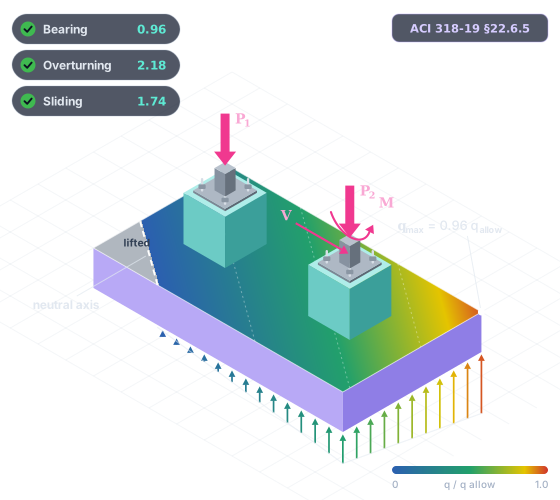
Illustration of a combined footing carrying two pedestals in isometric view, with the bearing pressure coloured across the base, a corner lifted off the soil, the neutral axis, anchor rods and the applied loads.
Area 200 Foundations — FoundaTrix Studio
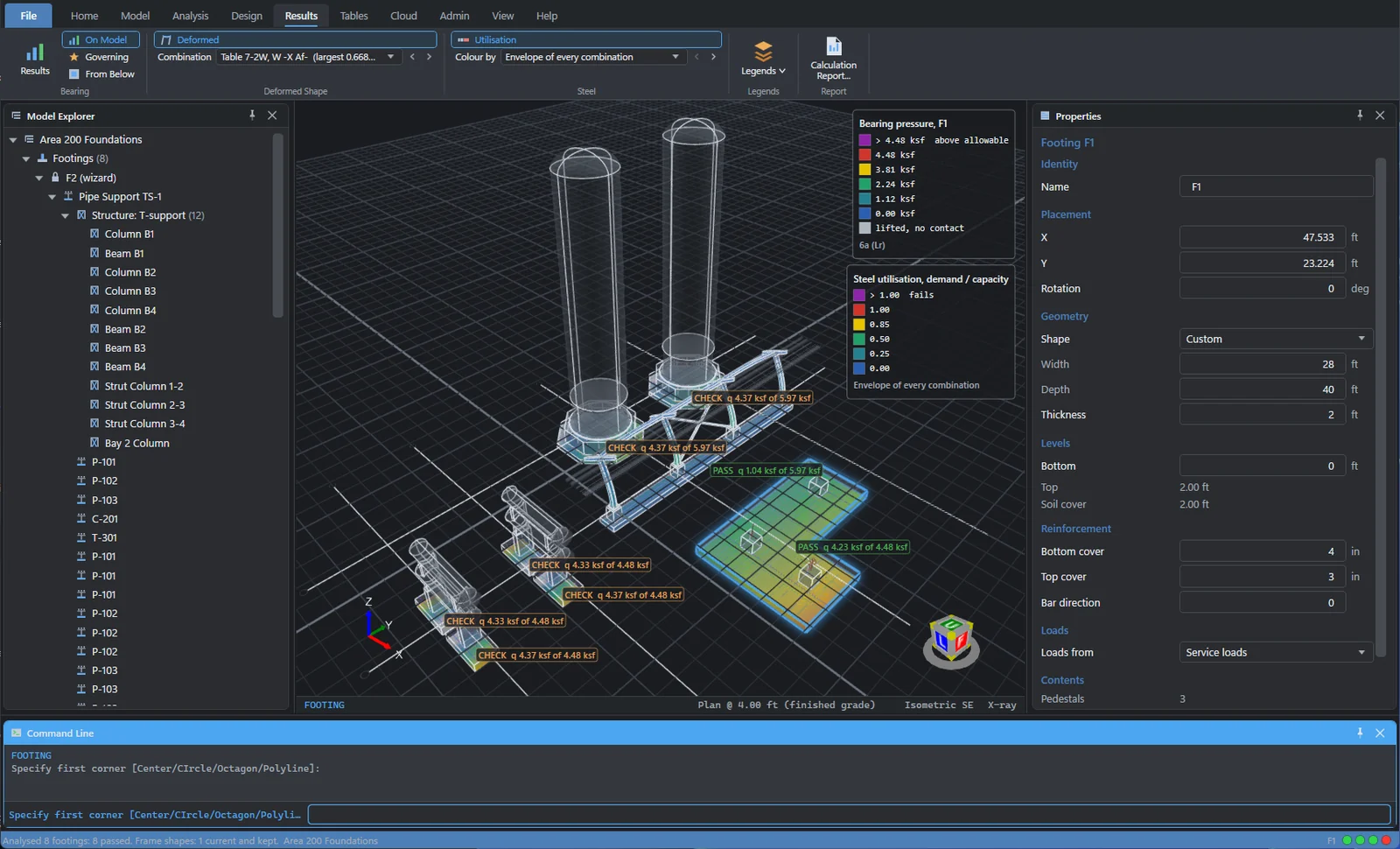
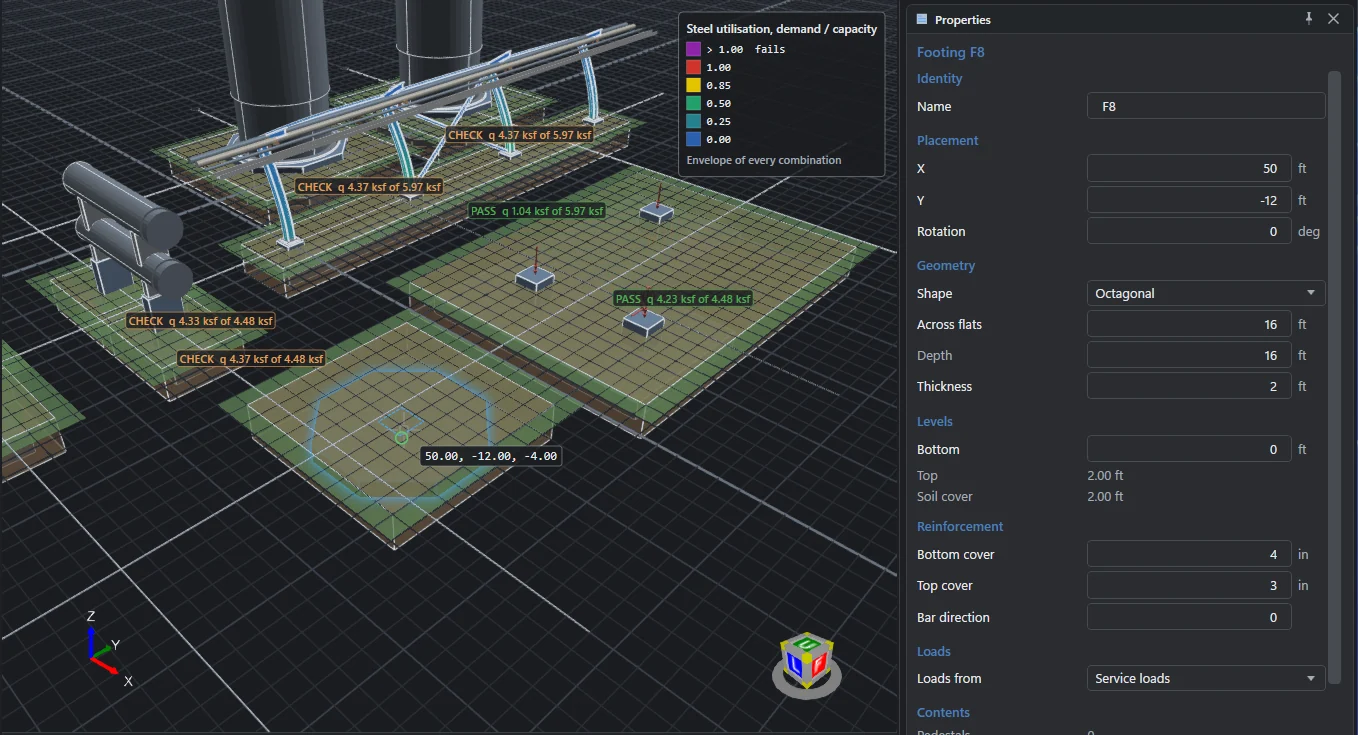
The FoundaTrix Studio workspace on a sample process area: two vertical vessels, two heat exchangers, a four-bent pipe rack, an L-shaped combined footing and an octagonal footing, the bearing pressure seen through the concrete with each footing's verdict, the rack's steel coloured by utilisation, the Model Explorer on the left and the Properties pane on the right.
Free · no account

Download it and start designing. No sign‑up. No subscription.

Modelling, analysis, concrete and anchor rod design, and projects saved on your own computer are free. They need no account, and they work offline. Sign in only when you want the cloud or the premium tools.

  • No account to create

    Install, open and model. Nothing asks for an email address before you can work.

  • No subscription, no trial clock

    The free capabilities are not a time-limited trial. Nothing counts down and there is nothing to cancel.

  • Works offline

    Analysis and design run on your computer. No connection is needed to model, run or design.

  • Your work stays yours

    No telemetry, analytics or advertising. Local projects are plain-text .rfnd files you keep.

Every rigid foundation

Not just spread footings.

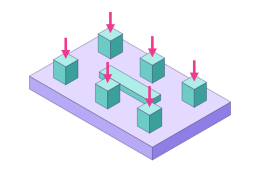
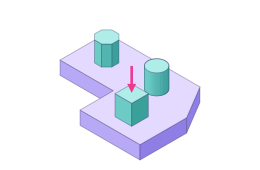
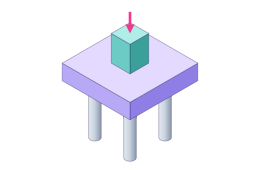
Spread, combined, strapped or mat; rectangular, round, octagonal or any polygon; one pedestal or dozens; on the soil or on piles. If the foundation can be treated as rigid, one exact method finds its bearing pressure or its pile forces, checks its stability and designs its concrete.

  • Spread footings

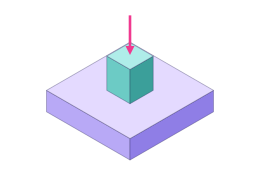
    One pedestal on one footing: the column or equipment base, in any outline.

  • Combined footings

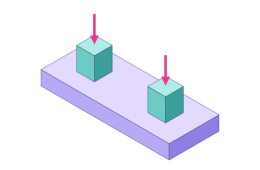
    Two or more pedestals sharing one footing, each with its own loads, cage and anchor rods.

  • Strapped footings

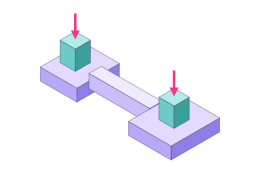
    Two footings joined by a strap beam and analysed as one rigid body; the strap designed as a grade beam.

  • Mat foundations

    One mat under many pedestals and plinths, from an equipment skid to a substation pad.

  • Any outline

    Rectangles, circles, octagons and irregular polygons, with pedestals of any shape placed anywhere on them.

  • Pile caps New

    A rigid cap of any outline on piles in any pattern, each pile analysed by its own PileTrix Studio analysis.

The one condition: the foundation acts as a rigid body. It must be stiff enough for the bearing pressure to vary linearly across the base: the classical assumption the whole method rests on. Where part of the base lifts, the soil carries nothing there and the program finds the part still bearing. On piles, the rigid cap is balanced on its piles and the piles carry everything.

Built on the documents you sign against

  • ACI 318-19
  • ASCE 7-22
  • AISC 360-22
  • AISC Design Guide 1, 3rd ed.
  • ASCE petrochemical guides
  • ASCE MOP 113
  • IEEE 693 · 605 · 980
  • PIP STC01015 · STE03350 · STE03360
  • IFC 4.3

What it does, free

Everything a rigid foundation needs, without signing in.

The core of FoundaTrix Studio is free: model the site, analyse every foundation on its own soil, and design the concrete and the anchorage, with each check citing its clause.

The Studio

Model the whole site in 3D, with drafting precision.

Draw footings and mats of any outline, rectangular, circular, octagonal or entirely irregular, with as many pedestals and plinths as they carry, on a work plane at finished grade. Click or type, the way a drafting program works.

  • Absolute, relative and polar coordinates, object snaps and set-out grid lines
  • Move, copy, rotate, array, mirror and measure, each a single undo step
  • Model Explorer, Properties and a Command Line around a fast 3D view
  • Unlimited undo that survives a save, Imperial or metric units, light or dark theme
Studio · Model
Modelling in the Studio: an octagonal footing just drawn from the command line, its properties in the pane on the right, and a pedestal being placed on it with the cursor snapped to the footing's centre.

Analysis

Bearing pressure solved exactly, even when the base lifts off.

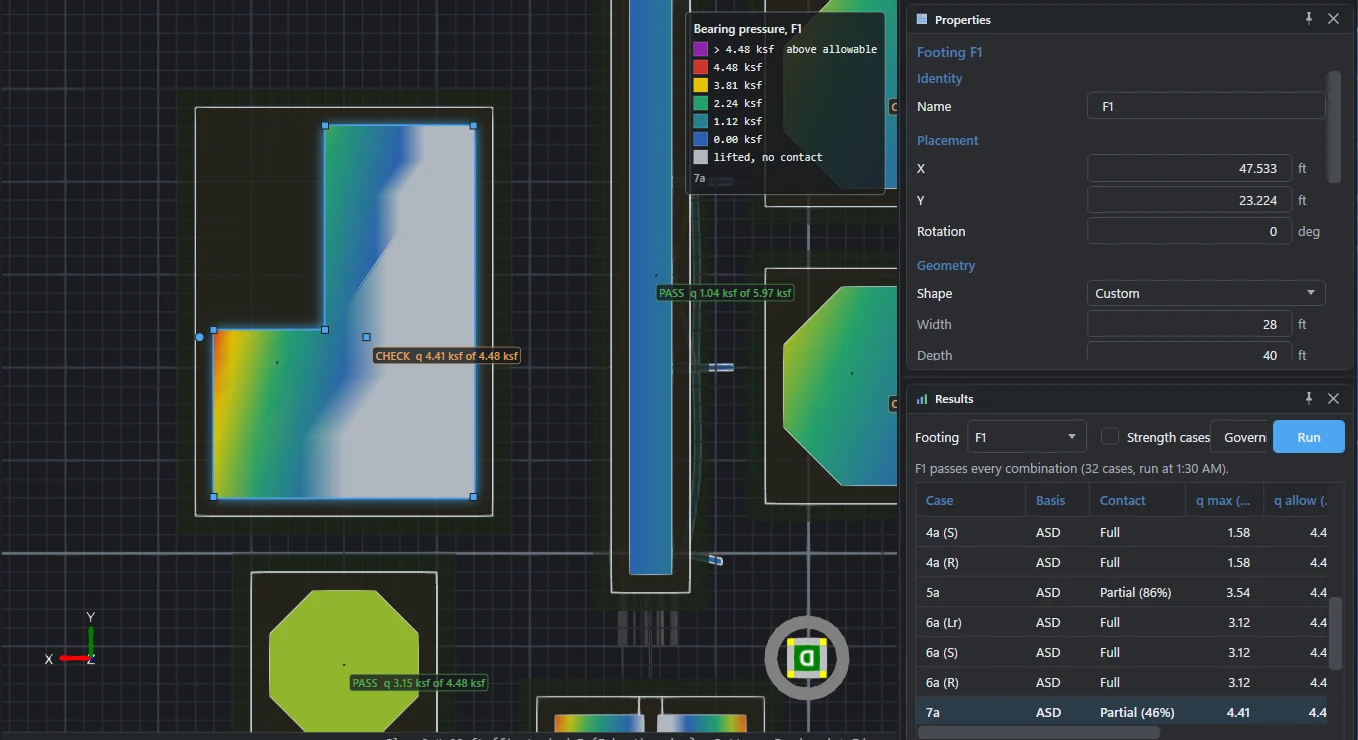
Under a rigid base of any outline, from a single footing to a mat under many pedestals, the program finds the pressure for every allowable-stress combination. Where part of the base lifts, it solves for the neutral axis that puts the pressure resultant exactly where the load acts, and reports how much of the base still bears.

  • Overturning and sliding on every allowable-stress combination, partial contact and net uplift reported
  • ASCE 7-22 combinations, strength and allowable stress, seismic included, each traced to its line of the standard
  • Your geotechnical report's net allowable, converted with each footing's own depth
  • ASCE 7-22 §2.3
  • §2.4
  • §12.4.2.2
Studio · Results
Looking up at the undersides: an L-shaped combined footing with part of its base lifted off the soil, drawn grey, and the pressure rising toward its loaded corner, beside the Results pane listing each combination with its contact state.

Concrete design

Footings, mats, pedestals and anchor rods to ACI 318-19.

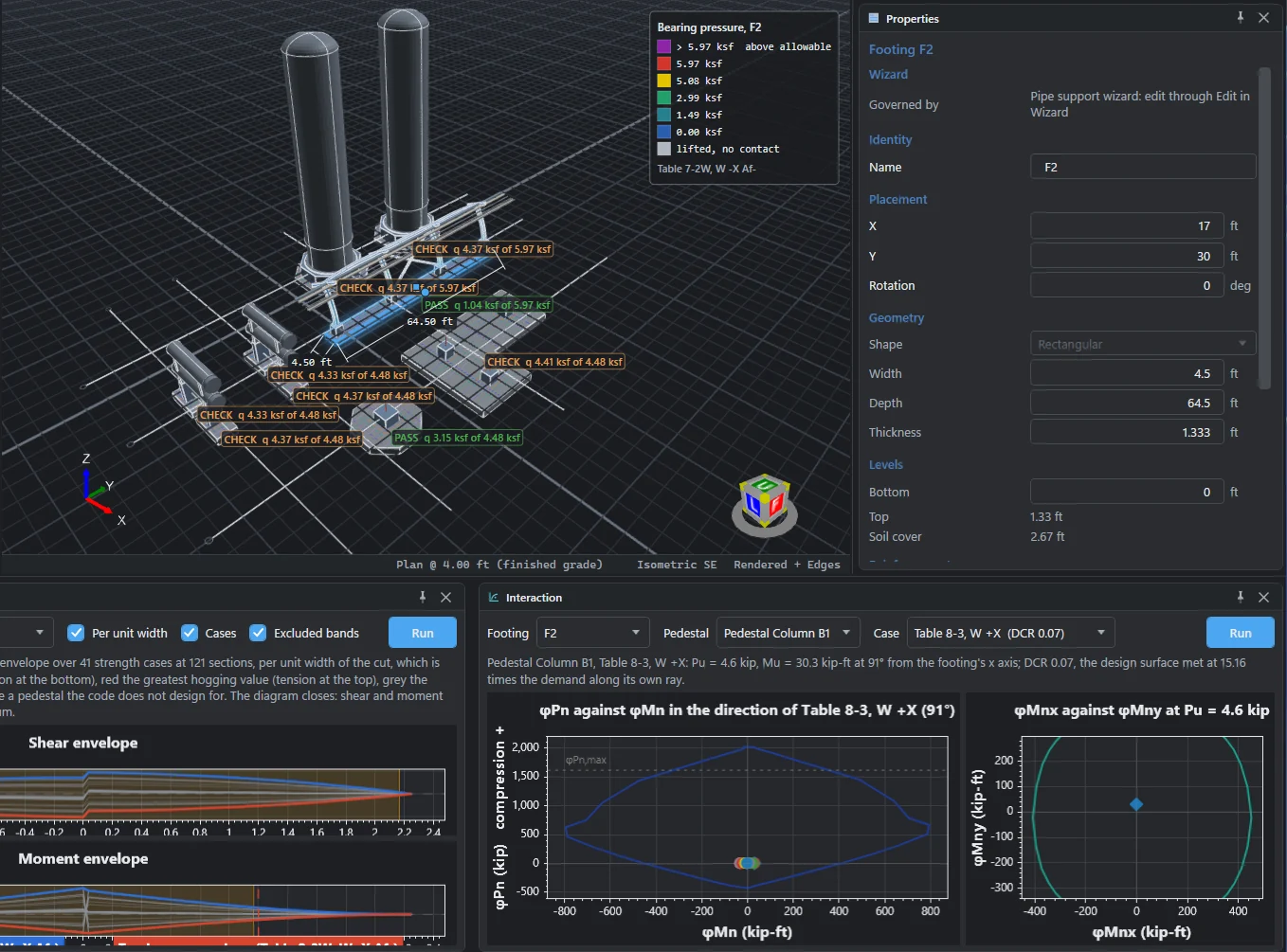
One-way shear and flexure come from a section swept across the footing and enveloped over every strength combination; four independent mats are sized and the bars picked for you.

  • Two-way shear around every pedestal, with the transferred moment's share
  • Pedestal axial force and moment on a full biaxial strength surface, plain or reinforced
  • Cast-in anchor rods to Chapter 17: steel, breakout, pullout, side-face blowout, pryout and their interaction
  • Strap footings, the strap designed as a grade beam, by strut-and-tie where it is deep
  • ACI 318-19 §22.6
  • Table 22.5.5.1
  • §13.3
  • Chapter 17
Studio · Design
The Envelope pane with the shear and moment envelopes swept across a footing, beside the Interaction pane with a pedestal's axial force and moment strength surface and its biaxial contour.

Tables

Spreadsheet-style tables that stay in step with the model.

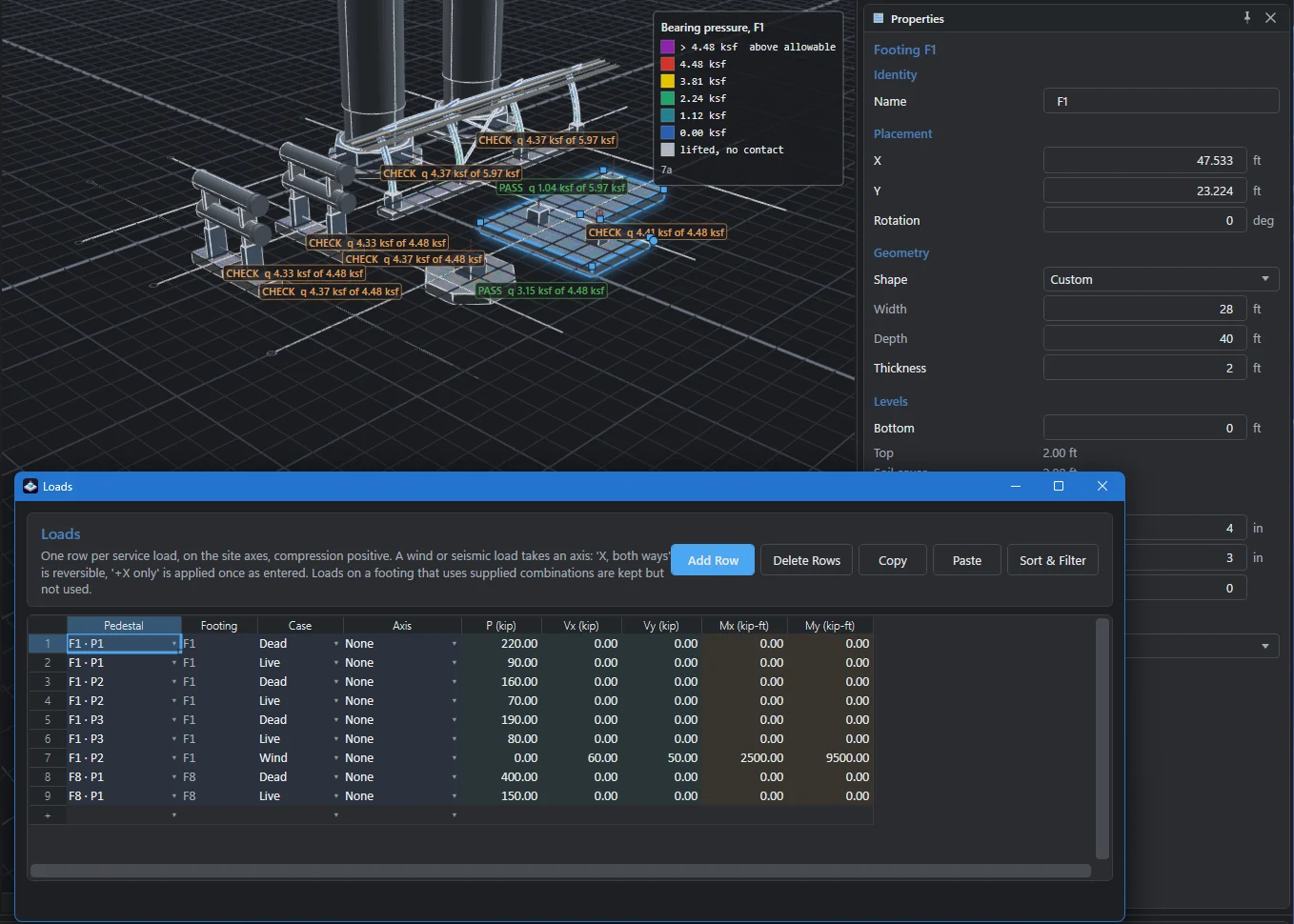
Every footing, pedestal, load and combination is also a row in a table beside the model. Paste combinations and reactions straight from a spreadsheet or a frame analysis, and the model follows.

  • Copy with headers, edit in your spreadsheet, paste back
  • Sort and filter any column, without reordering your data
  • Type a formula after = in any number field, and lengths in feet and inches
  • Supply your own factored combinations instead of the generated ones
Tables · Loads
The Loads table floating over the model: one row per service load with its pedestal, footing, case, axis and five components, in a spreadsheet-style grid.

Nothing approximated

Every outline and every number of pedestals take the same exact path through the analysis and the design; no shape is simplified into another.

The model checks itself

Problems are listed as you build, each with a code, a plain sentence and the object it concerns, before anything is run.

The full manual, built in

Methods, assumptions and limits, written so you can verify the engineering yourself, open beside your work.

Plain-text project files

A project is one .rfnd file you can keep under version control, archive, or send to a reviewer.

Pictures of the model

Copy or save the view, labels and dimensions included, for a memo, a markup or a meeting.

The cloud, when you want it

Sign in with an email address for cloud jobs, version history and a recycle bin, shared with your organization when you choose.

Premium

From a questionnaire to a complete, code-checked foundation.

The premium capabilities do the work that usually comes before the first footing is drawn, and after the last check passes: the loads, the combinations, the trial sizes, the steel, the calculation package and the BIM model.

Free for 30 days Sign in with an email address and every premium capability opens for 30 days from your first sign-in. Nothing is charged and there are no in-app purchases.
Vertical Vessel Foundation Wizard — Anchorage
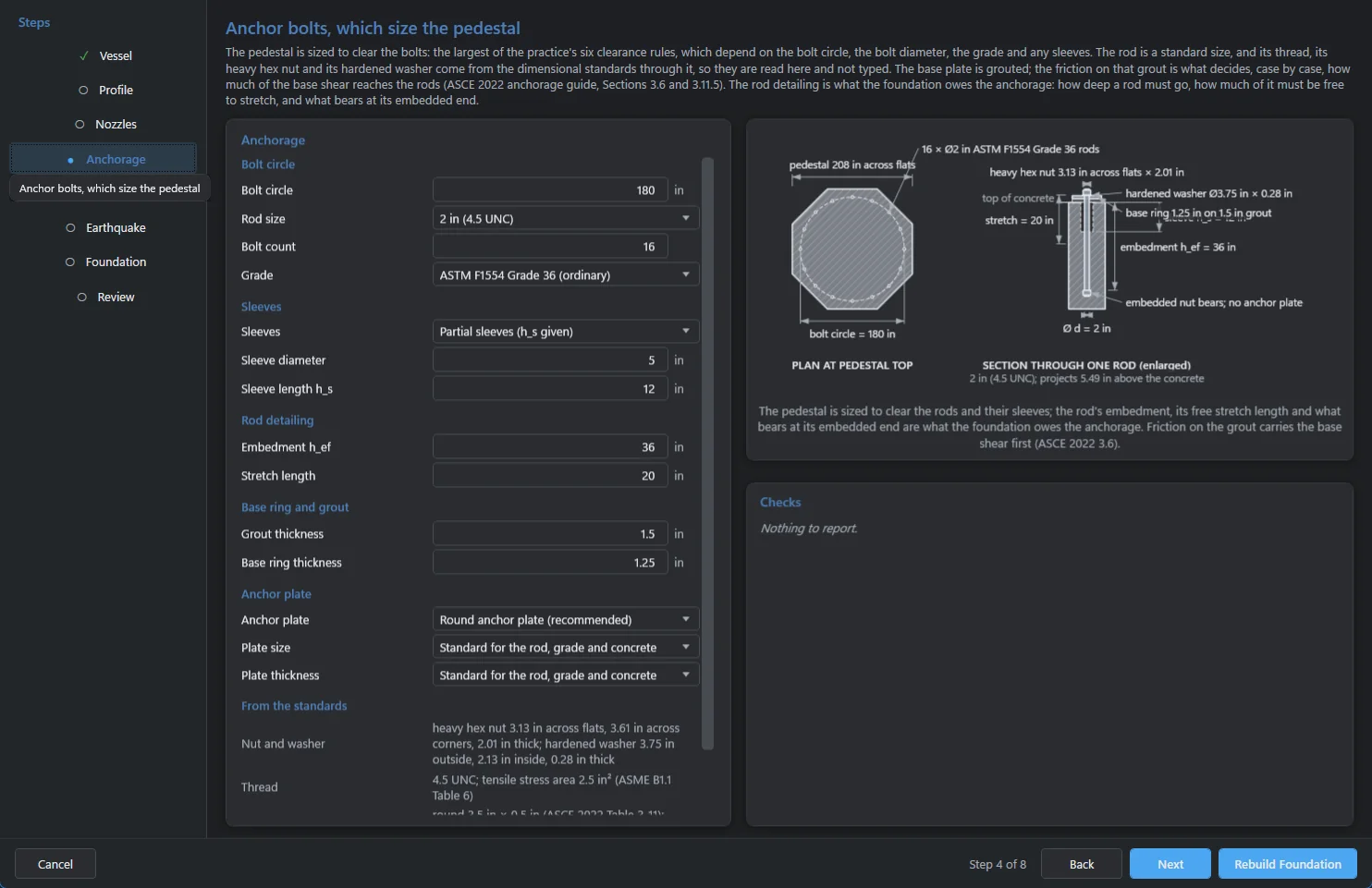
The vertical vessel wizard on its anchorage page: the steps on the left, the anchor rod questions, a dimensioned plan of the octagonal pedestal with its bolt circle, and a section through one rod with its nut, washer, sleeve and embedment.
Premium

Wizards that build real foundations.

Answer a guided questionnaire about the equipment and its site. The wizard works out the dead-load states, wind and earthquake to the governing standard and every load combination, proposes trial sizes and anchor rods, and records each decision with the clause behind it.

  • What it builds is an ordinary foundation you can edit, analyse and design like any other
  • Dimensioned drawings follow your answers: the dimension you are typing lights up
  • Every page checks your answers as you type, so nothing surprises you at Build
  • Before it builds anything, it lists every decision it made and the clause behind each
Premium · New

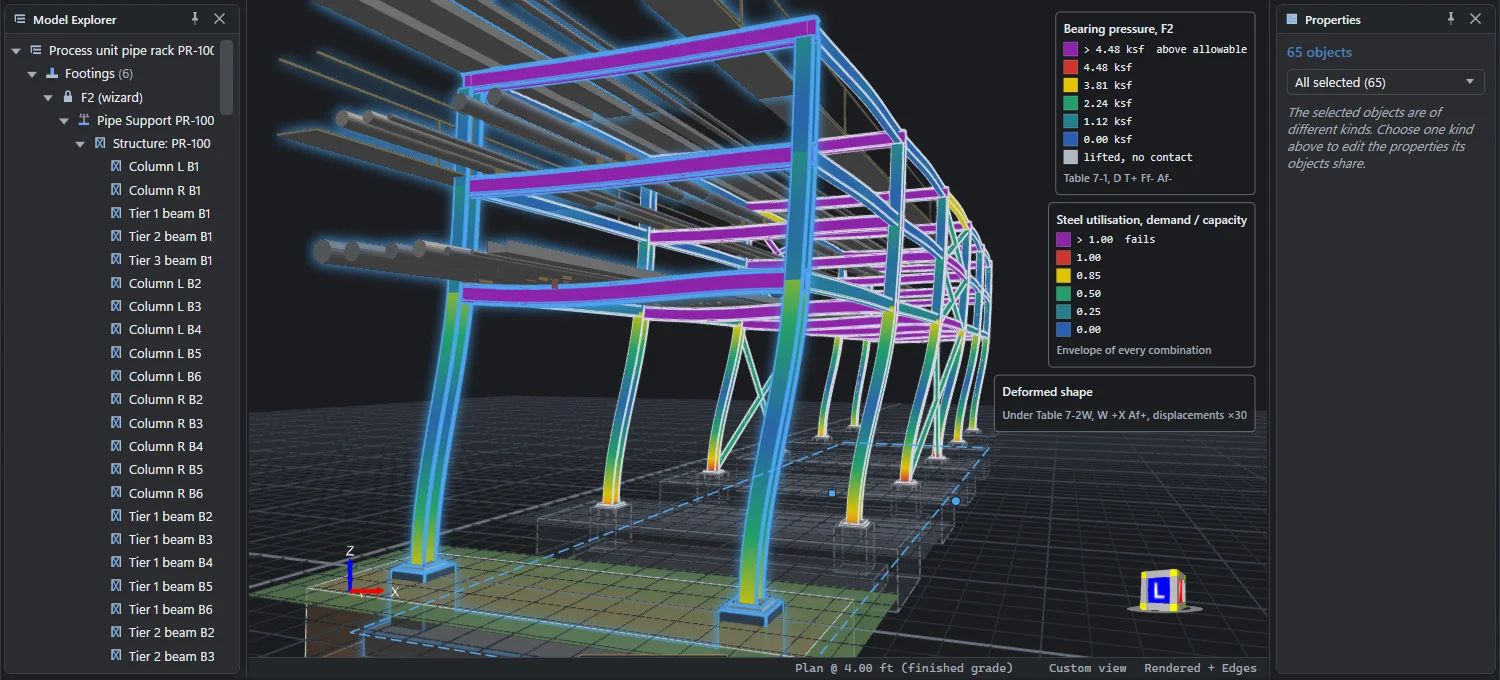
See the structure move.

Run works the deformed shape of every T-support, pipe rack and substation stand under each allowable-stress combination. Step through the combinations with the arrows and watch the frame sway, the beams sag and a slack brace stay straight, magnified so the movement reads at a glance.

  • Every member and brace bends along its length, worked by the frame analysis at full stiffness
  • Each combination listed with the largest movement under it
  • Shown with or without the steel's utilisation colours, each with its own legend
Results · Deformed shape ×30
A three-tier pipe rack of six bents drawn on its deformed shape under a wind combination, displacements magnified thirty times: the columns bow and the tiers sway, every member coloured along its length by its AISC 360-22 utilisation, over the bearing pressure under its footings, with the legends in the corner.
Results · Pile forces
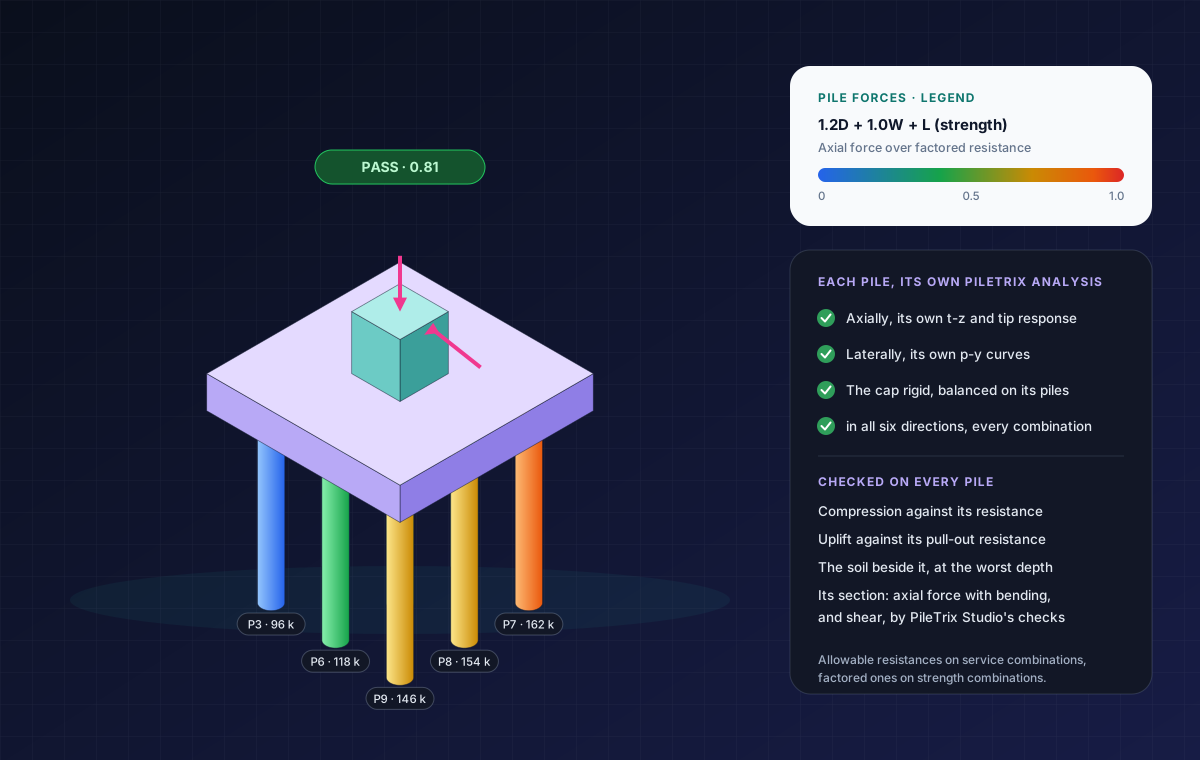
Illustration of a pile cap on nine piles under a vertical and a lateral load, each pile coloured by its axial force over its factored resistance and the front piles labelled with their forces, the cap's badge reading PASS 0.81, beside the legend and what each pile is checked for.
Premium · New

Foundations on piles, with PileTrix Studio.

Stand a cap of any outline on piles in any pattern. Each pile is a copy of a pile analysis from a PileTrix Studio design in the same cloud job, so it answers with its own soil, section and length. The cap is balanced on its piles for every combination. It needs a subscription or trial to PileTrix Studio as well, and the cap's own concrete design comes in a later version.

  • Each pile's head force from its own t-z and tip response, and its bending from its own p-y curves, in both directions
  • Compression, uplift, the soil beside each pile and each pile's section checked, allowable or factored by the combination's basis
  • Piles coloured on the model by their axial ratio, with their forces, in any combination you choose
  • A copy stays as it was copied until you bring it up to date, so a change in PileTrix Studio never moves a foundation behind your back
  • Vertical vessels

    Skirted and stepped vessels with nozzles, platforms and insulation, on octagonal foundations.

  • Horizontal vessels & exchangers

    Units and stacked pairs on two saddles, with thermal forces and bundle pull.

  • Transformers

    On a mat or in an oil containment pit, with plinths and every bushing checked.

  • Breakers, switches & bus supports

    Stands and braced frames with insulators, bus and fault loads, to ASCE MOP 113 and IEEE.

  • Pipe supports & racks

    T-supports and pipe rack bents carrying pipes, conduits, trays and walkways.

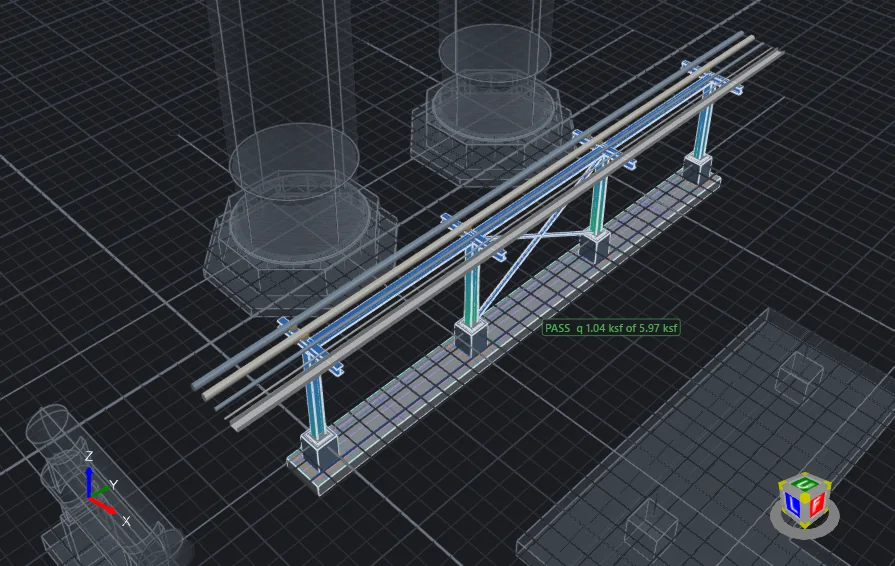
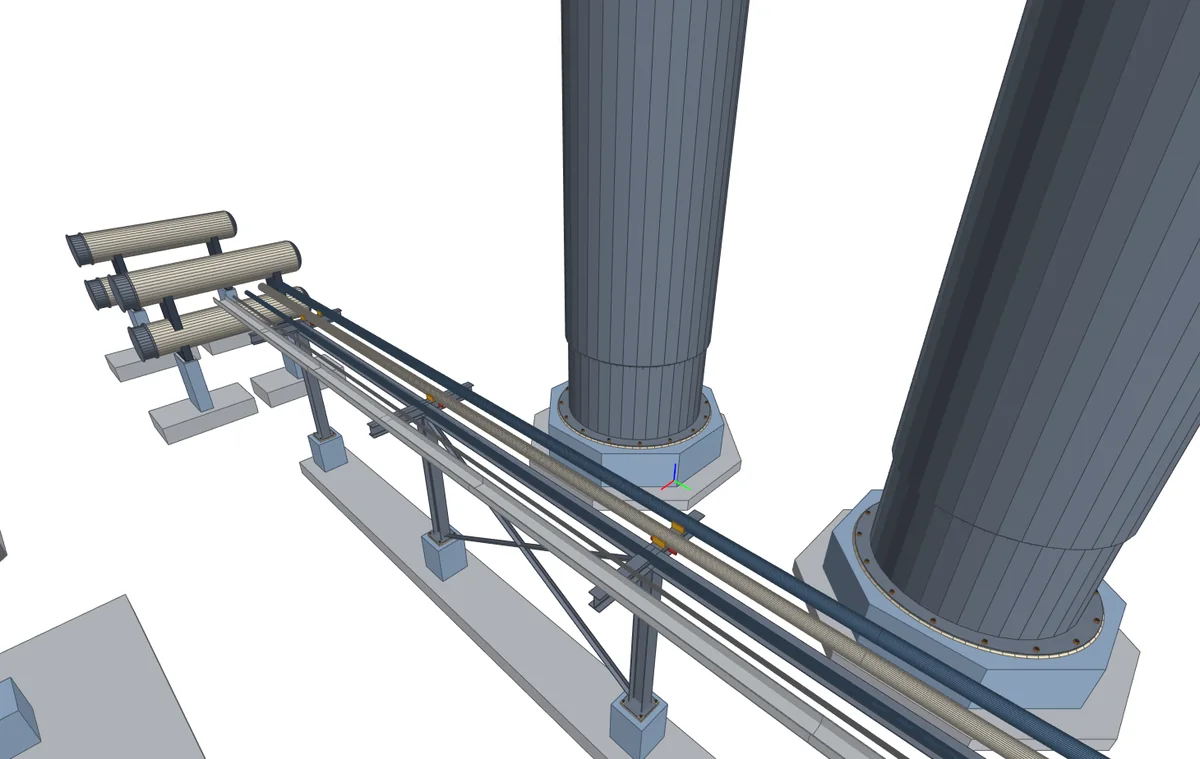
A four-bent pipe rack with its columns, beams, struts and braces coloured along their length by AISC 360-22 utilisation under one combination, the rest of the site shown faintly around it.
Premium

Steel design to AISC 360-22

Substation stands, T-supports and pipe racks are analysed as 3D frames by the direct analysis method, second order, and every member is checked by LRFD.

  • Base plates to AISC Design Guide 1, third edition
  • Name a group, such as W12, and get the lightest section that passes
  • The model coloured along each member by its utilisation
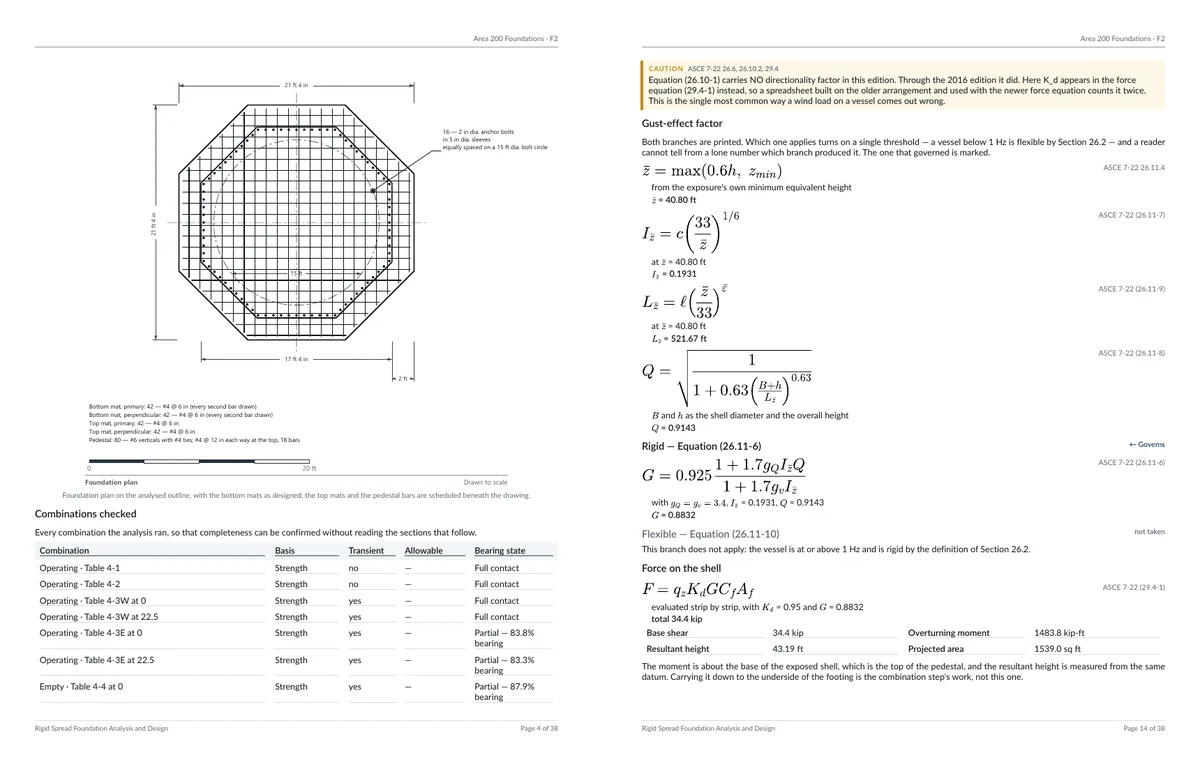
Two pages of the calculation report: the foundation plan drawn to scale with its mats and anchor rods, and the wind derivation, each equation printed symbolically and then with its values, beside its ASCE 7-22 clause.
Premium

The calculation report

A typeset PDF that prints every derivation twice: once symbolically, once with your numbers and units substituted, each beside the clause it comes from.

  • Your firm's name and logo on the cover and page headers
  • Dimensioned figures of the footing, pedestals and anchorage
  • Written only from a current analysis, never from stale numbers
The exported model in a third-party BIM viewer: the pipe rack's steel carrying insulated lines, and the vessels standing on their base rings with every anchor rod and nut.
Premium

IFC 4.3 and Revit export

Send the physical model to any BIM tool as IFC 4.3, or into Revit as native, editable elements through the included Ramisoft Revit add-in.

  • Reinforcement from the current design, as real bars
  • Anchor rods, nuts, washers and drilled base plates
  • Stable identities, so a re-export updates rather than duplicates

Job map and address lookup

See your cloud jobs as pins on a map and open one with a click. Place a new job by its address, or by picking the site on the map.

Loads that arrive with their reasons

Wind and earthquake to ASCE 7-22 and the governing practice, worked from the equipment's own geometry and period, and drawn on the model force by force.

New · AI assistants

Hand the datasheet to your AI assistant.

FoundaTrix Studio's cloud has a connector for AI assistants that accept custom MCP connectors, Claude among them. Give your assistant a vendor's cut sheet, a drawing or your notes, and it can create the complete, fully loaded foundation in your cloud job. The program behind it is the same one: a wizard foundation's inputs are checked by the wizard pages' own checks and the foundation is sized by the same calculation as Build Foundation at the desk.

  • It works as you: it signs in with your account, sees only what you can open and saves in your name
  • Every wizard kind: vessels, exchangers, substation equipment and pipe supports, and footings as you would draw them
  • Missing information is reported and asked for, never invented; nothing is saved until the inputs pass
  • It also searches every project and model you can open, of both programs

How to connect your assistant is explained in the program's user's manual (Help > User's Manual). Checking inputs, searching by project and creating a footing need only an account; a wizard foundation or a foundation on piles needs the same subscription the desk does, free during the 30-day promotional period. A model an assistant creates has not been analysed: open it, run the analysis and check its inputs against the source, as you would a colleague's.

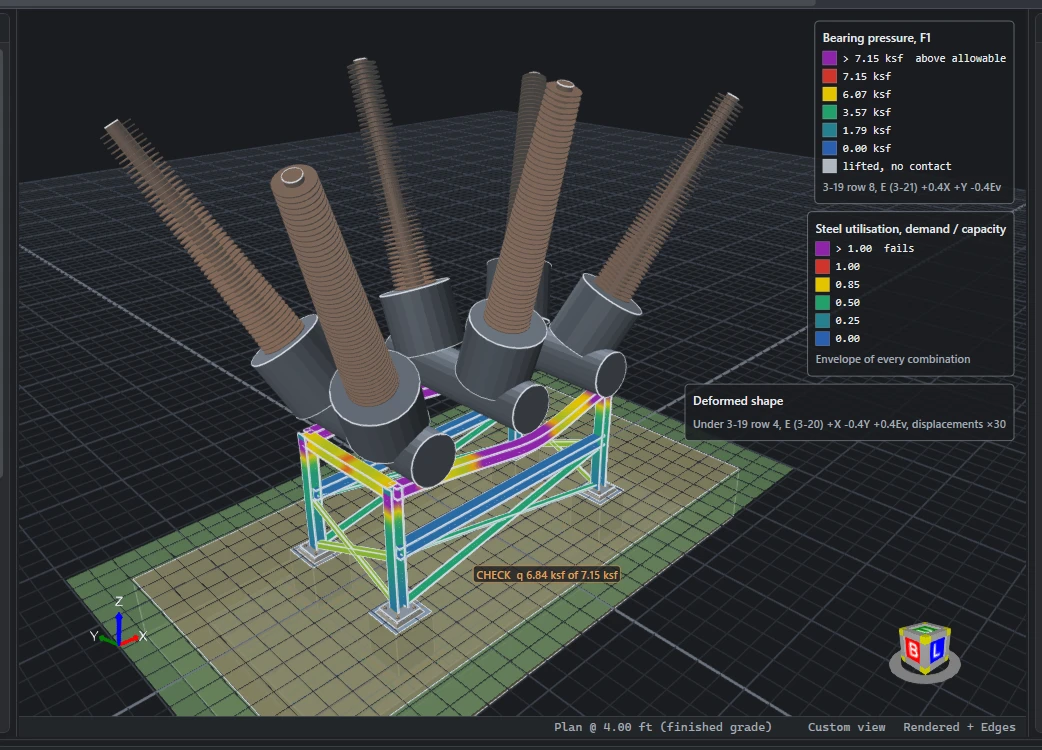
Circuit breaker · built from its outline drawing
A three-pole dead-tank circuit breaker that an AI assistant created from the manufacturer's outline drawing: six inclined bushings on their current transformers, the tanks on a braced steel stand, its base plates on the foundation; after a run at the desk, the stand drawn on its deformed shape with every member coloured by its steel utilisation, over the footing's bearing pressure, with the legends in the corner.
Created by an AI assistant from the manufacturer's outline drawing: the bushings at their angles, the stand, the base plates and the loads. Then run at the desk: bearing pressure, steel utilisation and the deformed shape.
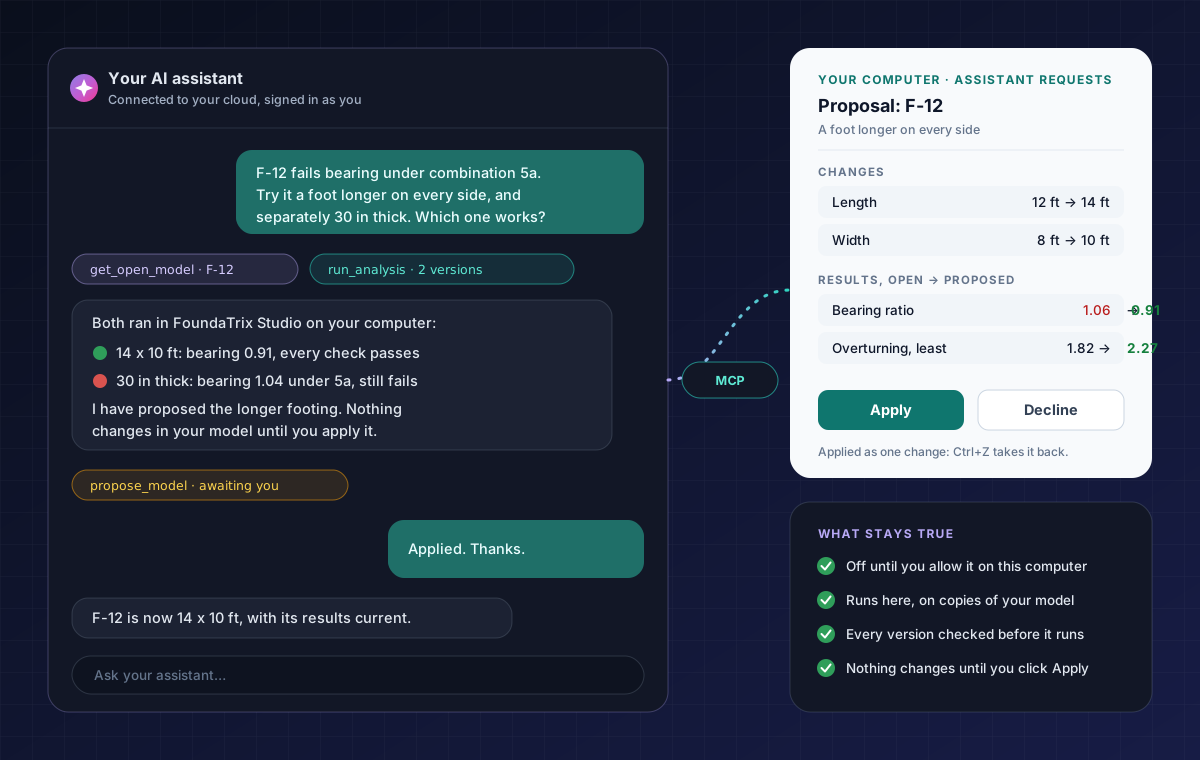
Illustration: an engineer asks an AI assistant to try a failing footing a foot longer on every side and, separately, thicker; both versions run in FoundaTrix Studio on the engineer's computer, the longer one passes and is proposed, and the engineer's Assistant Requests pane shows its changes and results with Apply and Decline.

New · What-if on your computer

Ask it for a what-if. Your computer runs it.

With the program open and you signed in, your assistant can study a footing of the model you have open: change what you ask, run the versions on your own computer with FoundaTrix Studio's own analysis and design, compare them, and propose the one that works. You click Apply, or Decline.

  • Off until you allow it on each computer; every request is listed where you can watch it and cancel it
  • Up to eight changed versions at a time, each checked first and run on its own copy of your model
  • A proposal shows every change and its results beside yours, and one Ctrl+Z takes an applied one back

Running what-ifs needs only an account; a version that adds a wizard's questionnaire or piles needs the subscription the desk does. Your open model never changes unless you click Apply.

Plans

Start free. Sign in when you want more.

The engineering core costs nothing and asks for nothing. An account adds the cloud, and a 30-day pass to everything premium.

No sign-up

Free

$0no account

Everything you need to model, analyse and design rigid foundations on your own computer.

  • Spread, combined, strapped and mat foundations
  • 3D modelling in the Studio
  • Bearing, overturning and sliding
  • ACI 318-19 footing, pedestal and anchor rod design
  • Tables, formulas and spreadsheet paste
  • Local project files, offline
Download free

Signed in

$0sign in with email

Everything in Free, plus the cloud, and every premium capability for 30 days from your first sign-in.

  • Cloud jobs and designs, on any computer
  • Version history and a recycle bin
  • Share jobs with your organization
  • A client roster for your jobs
  • 30 days of every premium capability
How signing in works
Premium

Pro

Soonpricing to be announced

Every premium capability without a time limit, for engineers and firms. Try all of it free today.

  • Wizards for five families of equipment
  • Foundations on piles, with PileTrix Studio
  • Steel design to AISC 360-22
  • The typeset calculation report
  • IFC 4.3 and Revit export
  • Job map and address lookup
Try premium free for 30 days

Download

Get FoundaTrix Studio for Windows.

Free to download and free to use, with no account. Installed from the Microsoft Store, which keeps it up to date.

Get it from theMicrosoft Store

Free · no account needed · Windows 10 (version 2004 or later) or Windows 11, 64-bit

  • SystemWindows 10 or 1164-bit; version 2004 (build 19041) or later
  • Processorx64Windows 11 on ARM runs it under emulation
  • Memory4 GB minimum16 GB for large sites and frames
  • GraphicsDirectX 11Recommended for the 3D view
  • Display1366 × 768 or larger1920 × 1080 recommended
  • InternetOnly when signed inFor the cloud and the premium tools

Feedback

Found a bug? Have an idea? Tell us in the open.

FoundaTrix Studio's issue tracker is public on GitHub: see what has been reported, follow what is being fixed, and vote for what should come next.

Report a bug

Something wrong, a number that looks off, a crash? Tell us what happened and how to see it again.

Open a bug report

Request a feature

A standard you need, a kind of foundation, a workflow it could save you. Ideas from practice shape what comes next.

Suggest a feature

Write privately

Confidential project data, licensing, your account, or a security concern: email us rather than posting in public.

admin@ramisoftsolutions.com

An engineering aid, not a substitute for engineering judgement

The soil response is not modelled: the allowable bearing pressure and other geotechnical inputs are taken as given. Verify all results independently before relying on them in a stamped submittal. See the terms of use.